Tuesday, 28 February 2017

5 Pros and Cons: Honest Review After One Year with Sony Mirrorless

After one full year using the Sony mirrorless system for my professional work, I believe I can give a very honest and helpful review of the system that can help others decide if it’s right for them.

Here are the top 5 pros and cons of the Sony system after one year:

The Pros

1. Electronic Viewfinder

If you asked me what my favorite thing is about my Sony mirrorless camera, it would be the electronic viewfinder.

Being able to preview the final image before I take it has not only made my work more consistent, it has naturally allowed me to stop “chimping” as much as I did when I shot with my Canon 5D Mark III. Reviewing images in bright sunlight has also never been easier, since I can do that in the viewfinder.

2. Image Stabilization

Sony offers 5-axis in-body stabilization in its newest camera bodies that is very useful, especially for a hybrid photographer like myself.

This feature allows me to use any lens (like a fast prime) and give it stabilization—including any lens you can attach with an adaptor. There are two ways I benefit from IBIS: being able to get sharp images at slower shutter speeds, and the ability to get good handheld video footage with any lens

3. Eye Autofocus

Say goodbye to blurry portraits! The continuous eye autofocus feature allows me to get tack-sharp focus on the model’s eye at the push of a button. In good light, it is very accurate and consistent. In low light, it doesn’t work well and reverts back to facial recognition.

With this feature, there is no need to focus and recompose or keep adjusting your focus point—it places a little green box around your model’s eye and it will continuously track it as he or she poses and moves around. As someone who likes to shoot at wide open apertures, this is a must-have feature.

4. Size

There is no question that one of the biggest reasons why photographers move to mirrorless in general or Sony specifically is for the smaller form factor.

It seems the “professional” lenses are, the larger and larger they get. That said, it is your choice if you want to use the larger lenses. There are a decent number of smaller primes that the Sony system offers that keep the kit small and compact without sacrificing image quality, like the 55mm f/1.8.

5. Image Quality

Not only are these cameras feature-packed, they offer tremendously good image quality. Coming from the Canon system, I can say without a doubt that the Sony sensor trumps the Canon sensor when it comes to dynamic range and shadow recovery.

The full-frame A7RII and crop sensor A6500 gives me unreal resolution, dynamic range, and sharpness that I’m extremely happy with, and has allowed me to get the most out of my photos.
The Cons

1. Battery Life

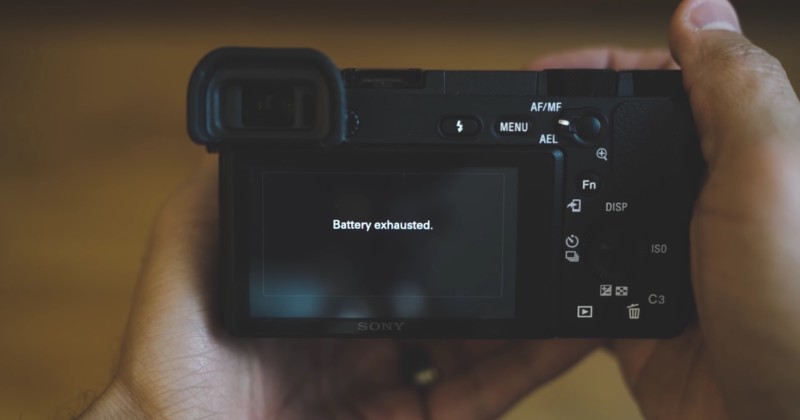
This shouldn’t come as a surprise to anyone, but the battery life on Sony cameras is almost offensive when comparing to a DSLR.

Owning over 7 batteries has allowed me to never run out of juice while shooting a wedding or photoshoot, but having to always be aware of the battery life can be annoying. Charging the batteries every night can also become a nuisance, so make sure you own multiple battery chargers as well.

2. Start-Up Lag

This lag that I speak of really became a problem when I was photographing weddings. When the camera would fall asleep, it would take at least 3 seconds to wake up and be ready to take a photograph. I missed many spontaneous moments because of this lag and I have to say, I really hope Sony can address this.

It also forces you to strategically replace your batteries when shooting an event, because the camera will take around 7 seconds to take a photograph after replacing its battery!

3. Only 1 SD Card Slot

This is one of the big reasons why a lot of pro photographers haven’t switched to Sony yet. As a Wedding photographer, I really like the peace of mind of having a backup of my images just in case an SD card goes bad.

I think (read: hope) it’s only a matter of time until Sony begins to implement dual SD slots into their more professional line of cameras.

4. Low Light Autofocus

Coming from the 5D Mark III, I was really accustomed to having great low-light autofocus. When I began using my first full-frame Sony camera (the A7II) I couldn’t believe how inconsistent it was focusing in low light.

I began to change my shooting style, aiming for “contrasty” edges on my subjects so I could acquire focus. This is improved on the Sony A7R II and A6500 cameras, but it still isn’t up to par with my old Canon system.

5. Lack of Budget Lenses

There is no question that moving to Sony is a very expensive switch. For those who will be starting out with a Sony a6000/a6500, there aren’t many native lenses that are budget-friendly. Sony needs more lenses within the $600 range for both the full-frame and APSC lineup.

The 85mm f/1.8 Sony lens was just announced at $600, and its optical performance is very promising. I really hope a 16-50mm f/2.8 lens is on the horizon for the APS-C line of Sony cameras.


About the author: Manny Ortiz is a Chicago-based photographer with a passion for “capturing the true spirit and personality of the people that I photograph.” To see more of his work, visit his website, follow him on Instagram, or subscribe to his YouTube channel. This post was also published here.


from PetaPixel https://petapixel.com/2017/02/28/5-pros-cons-honest-review-one-year-sony-mirrorless/

Natural Light vs Flash vs High Speed Sync: See the Difference

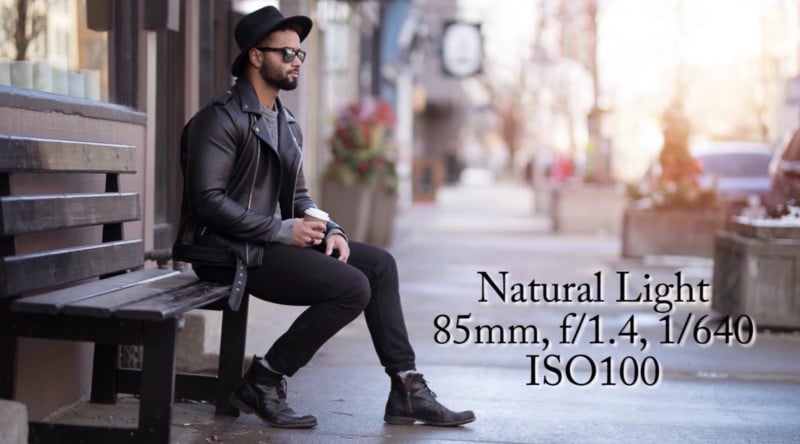
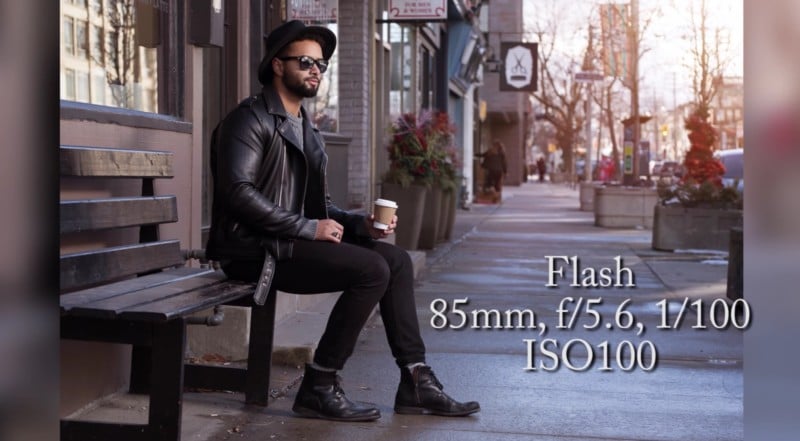
Same setting, same model, three different lighting scenarios. In this demo, Toronto wedding photographer Derrel Ho-Shing shows you the difference between shooting with natural light, regular strobe, and high speed sync.

Ho-Shing didn’t put the video together to make any sort of judgement, although his preference is obvious. He’s shooting with the Canon 5D Mark IV and new Sigma 85mm f/1.4 Art lens, and having to stop that beautiful lens down to f/5.6 in order to use the strobe without HSS is just… tragic. The lighting looks fine, but the background is simply too in-focus and distracting.

By comparison, just natural light creates more separation and, thus, a more pleasing portrait:

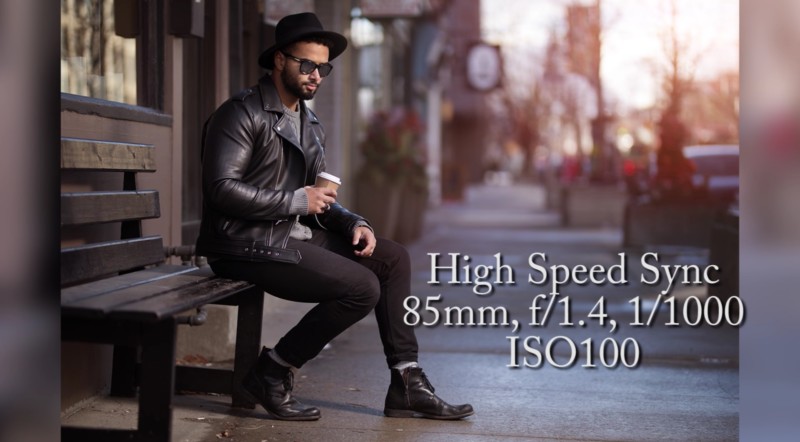
And, of course, things get even better when you turn on High Speed Sync. Using the flash’s power to keep your subject properly exposed, HSS lets you create even more separation by both shooting wide-open and darkening the background.

In this example, at least, HSS wins hands down:

Watch the video up top to see the full demo for yourself. And if you like Derrel’s work, check out his website or show him some love on Facebook and Instagram.

(via ISO 1200)


from PetaPixel https://petapixel.com/2017/02/28/natural-light-vs-flash-vs-high-speed-sync-see-difference/

Simple Web Tool Helps You Find Your Ideal Lens by Choosing 20 Photos

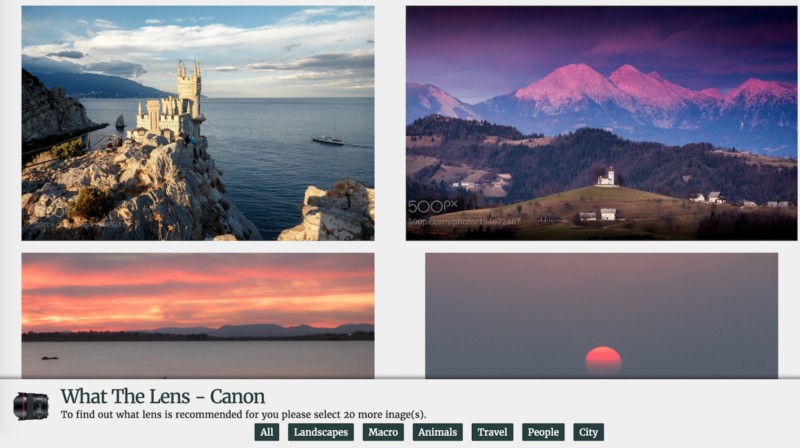
There’s a useful new tool on the Interwebz, and it promises to help you decide what lens you should purchase next. Just select a category and pick 20 favorite photos as you scroll through, and What The Lens will reveal your lens preference.

This simple little Web tool was created by photographer Willie C, and it’s admittedly a bit limited at this point. For now, it only offers Canon lens suggestions, makes no consideration for your budget, and is basically unusable on a mobile phone (sorry smartphone readers). However, Willie promises to fix these issues soon.

So, how does it work?

We’re still waiting to hear back from Willie, but as far as we can tell, the app uses the 500px API to display the photos for you to pick. Then it looks at the EXIF data of the 20 photos you selected, and displays up to 3 ‘favorite’ lenses complete with a link to Amazon in case you want to go ahead and order something right away.

Editor’s Note: Since it uses 500px as an image source, the app can quickly become a bit too risqué for work, so be warned. You’re usually safe sticking to the Travel or Landscape categories, but scantily clad ladies await if you dare browse through the People category.

Will this app show you the ideal lens you never knew you needed? Eh, probably not. But if you can put aside your processing, subject, and lighting preferences and select photos based on lens qualities like focal length and depth of field alone, you might just learn something about your personal glass preference.

Give the site a shot here, and let us know your ‘ideal’ lens in the comments.


from PetaPixel https://petapixel.com/2017/02/28/simple-web-tool-helps-find-ideal-lens-choosing-20-photos/

Hasselblad Announces 4 New Lenses for Mirrorless X1D: 3 Primes, 1 Zoom

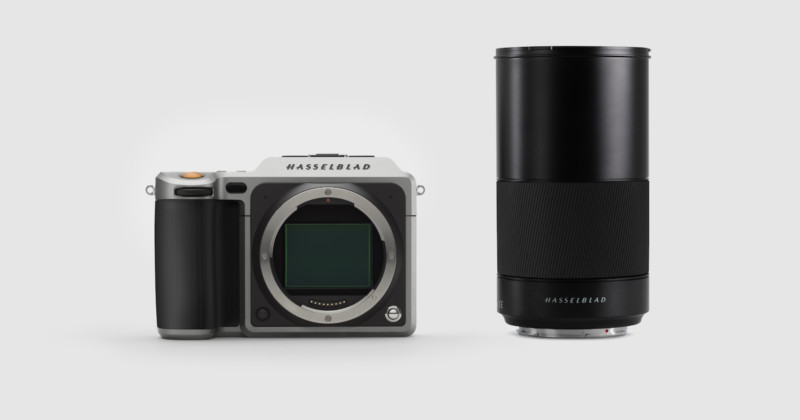
Hasselblad doesn’t want to lose the momentum they gained by being the first to announce a mirrorless medium-format digital camera system with their exciting X1D. Which is why they’ve decided to announce not one, not two, not even three, but four lenses for the new system coming in 2017. One is available today.

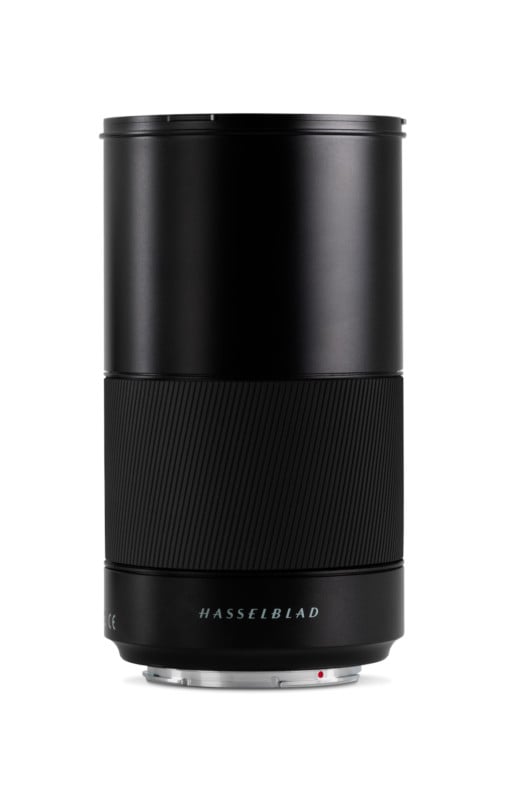
The announcement is one fourth real news and three fourths teaser, but we’ll let this one slide. The four lenses announced are the XCD 35-75mm Zoom, XCD 65mm, XCD 22mm Wide Angle, and XCD 120mm f/3.5 Macro lenses, but only the 120mm Macro is getting here any time soon. Here’s a closer look at this lens:

“Providing a new versatility to the X1D user, the lens is suitable for both close-up work up to a 1:2 image scale, and also as a mid-range telephoto lens for portrait or other photography requiring a longer focal length,” writes Hasselblad by way of introduction to the new lens. “Auto or manual focusing goes from infinity to 1:2 without the need for extension tubes.”

Inside the lens, you’ll find an integral central shutter that allows flash synchronization up to 1/2000th of a second, and an aperture that goes from f/3.5 all the way to f/35. More detailed specs such as number of elements and groups, special elements, coatings, etc. were not mentioned in the specs Hasselblad sent us, and the official product page has yet to go live as of this writing.

The 120mm f/3.5 Macro is scheduled to arrive in June, although no price has been provided just yet. It brings the X1D-specific XCD lens line up to 4 lenses, and “by the beginning of 2018” Hasselblad promises to add three more lenses to the line—the aforementioned 35-75mm, 65mm, and 22mm—for a total of 7 dedicated XCD lenses.

Keep an eye on this page for more information about this lens… hopefully soon.


from PetaPixel https://petapixel.com/2017/02/28/hasselblad-announces-4-new-lenses-mirrorless-x1d-3-primes-1-zoom/

Monday, 27 February 2017

Tips for Photographing Your Own Kids

Are you one of those parents whose kids were born being comfortable in front of the camera? Are your kids complete naturals with no stage fright or anger management issues when you yell, “Look at me…for the last time…please look at me and don’t close your eyes”? If so, then just skip this article and move on to the next one that probably teaches some amazing tips and tricks on night photography, or posing or Lightroom tricks.

But, if you are like me, a camera obsessed parent whose children sprint at what seems like a-mile-a-minute when they see you, camera in-hand, and a determined look on your face, coming towards them to snap a frame, then keep reading. I have a few tips and tricks to help you maintain your sanity and snap a few Kodak moments of your pride and joy that you can “oohhh” and “ahhh” at for years to come! In other words, top for photographing your own kids.

Tips for Photographing Your Own Kids

Is this a family portrait you can relate to?? Imperfect timing + Imperfect expression = Perfect Family Photo

Note: Some of the images in this article are not edited and some are technically flawed – they are simply used to drive home the tips shared below. The images that I print of my family are edited to my particular style. You will find a lot of rules broken here but I am okay with these as my focus was not on photographic perfection but on capturing the moment.

Know when to click and when to back off

This one is a game changer in your relationship with your kids and your camera. Yes, the very definition of being a parent is that we are insanely in love with our kids and want to freeze every moment of their childhood, teen, and adult lives forever in our brain and forever in photographs. I mean, what parent doesn’t want to whip out images of their babies years later at their wedding. Not as a means of embarrassing them but as a way to cherish all the fun times they have had in their parent-child relationship.

But sometimes, just sometimes, it is completely okay to skip that insane urge to freeze the frame and instead BE in the moment. I still remember many of my children’s “firsts”. Even though I may not have photographs to prove it, I have my memories that I have documented in their journals and talked about with them. I am okay with neither of us remembering these things decades later because I know that every day we create new memories that simply replace some of the old ones.

Tips for Photographing Your Own Kids

I tried for a good 20 minutes to try and get both of them to look at the camera and smile at the same time…but alas, this was the best I could get. But this is one of the most precious memories because a few months after this was taken, I lost my mom to cancer. So this grandmother-grandson memory is priceless…in all its flaws lies its perfection!

Embrace the chaos

This one is a little hard to digest because as photographers we tend to be perfectionists. The lighting has to be right, the styling has to be perfect, and the angle and composition has to be one of the allowed rules. You know, all those things that we learn in Photography 101, Photography 201 and perhaps even Photography 301!

But guess what, all of that doesn’t quite matter when you have all of three seconds to take the shot. Most of the time that my family is together is in the evening hours. When the night is fading and I am only left with either using the overhead florescent light or pop on an off-camera flash, neither of which I really like. But sometimes it is okay to break the rules and just go with the flow. Yes, every frame here will not be PERFECT and more than likely, it will break all the rules of the photography but

But sometimes it is okay to break the rules and just go with the flow. Yes, every frame here will not be PERFECT and more than likely, it will break all the rules of the photography but that’s okay. It may be more important to capture that fleeting moment than to be technically correct.

Tips for Photographing Your Own Kids

The first Lego car that he completed all on his own. I was just an observer and had one shot. The light was terrible, his clothes were completely mismatched, but it was a moment I wanted to cherish forever.

Tips for Photographing Your Own Kids

Another moment that means nothing to him but everything to me. My boys just hanging out doing their thing – reading and napping!

Tips for Photographing Your Own Kids

A creative lighting exercise gone wrong – thanks to a sleepy and nervous dog who was scared of the shutter clicking!

Follow their lead

This one is a little harder to experience especially if you have little ones. Right now, my kids are at the age where they are opinionated on what, where, and how they want to be photographed.

My son plays soccer and insists I take pictures of his games every weekend. My daughter, who is an equestrian rider, wants several hundred shots of her horse – from every angle, covering every detail. But I have found that if I oblige their photography wants, they are more likely to listen to me when the tables turn (a.k.a a little bribery never hurts). Besides like any parent, I know that these moments are just as precious as their traditional portraits even if they are blurry because I missed focus when he was kicking the ball or when she rides her favorite horse.

Besides like any parent, I know that these moments are just as precious as more traditional portraits – even if they are blurry because I missed focus when he was kicking the ball or when she rides her favorite horse.

Tips for Photographing Your Own Kids

A technically flawed image (out of focus) for my daughter. A shot of her favorite horse and her favorite instructor.

Tips for Photographing Your Own Kids

Something a little bit more my cup of tea – an action shot that makes me hold my breath every time she jumps!

Tips for Photographing Your Own Kids

This was the highlight of my son’s soccer game…for me and for him!

Hand over the reins

A few years back there was a beautiful article that was written for moms who were also photographers. This really hit home to a lot of us moms. It encouraged moms who are generally behind the camera to be brave and exist in photographs with their kids, for their kids. It is absolutely acceptable if your hair is not perfect, you are in your sweat pants, and have no makeup on. Being present in photographs is more important than taking several hundred photos where you are nowhere to be found.

Since that day, I take the photos that I want but also hand over the camera to my husband or a stranger who volunteers to take our picture. Sometimes I even use the remote trigger so I can be a part of my kids’ childhood just as much as their dad, especially on important occasions like family vacations and birthdays.

Tips for Photographing Your Own Kids

The MUST have photo of any birthday party. Heads chopped off, goofy faces and partial cake – thanks to a helpful, willing volunteer! But I am with my child and that makes me happy!

Tips for Photographing Your Own Kids

Because out of focus photos are so very artistic! For a clearer picture, try switching to Auto mode and then handing the camera over to a willing helper!

Tips for Photographing Your Own Kids

The magic of a remote trigger! Our family in our element!

What are some tips and tricks that work when you photograph your own children? When all else fails, perhaps chocolate and candy are the way to go, for adults and kids alike! Please sure your tips and photos in the comment section below.

The post Tips for Photographing Your Own Kids by Karthika Gupta appeared first on Digital Photography School.


from Digital Photography School https://digital-photography-school.com/tips-photographing-your-kids/

How to Make Custom Bokeh Shapes

How to Make Custom Bokeh Shapes

The theory

Bokeh (pronounced b??k?) is a Japanese term that translates to blur in English. Bokeh is used by photographers to describe the quality of the unfocused or blurry parts of a photograph. Every photograph has a depth of field – the area of a photograph that is in focus.

For example, in the image below, the upper half of foreground is sharp and in focus, meaning that it is inside the depth of field. The background, however, is blurry or outside of the depth of field. The reason the leaves in the upper foreground are focused is because I physically positioned myself close to them with my camera set to a wide aperture – resulting in a shallow depth field and an unfocused background. It’s this subsequent softness and shape in the background that is described as Bokeh.

How to Make Custom Bokeh Shapes

Looking at the image again, you’ll notice that the points of light in the unfocused areas of the photograph are circular in shape. That’s because my lens renders them to appear that way. However, you can change this shape to create your own patterns by making simple filters and attaching them to your lens.

What you need to make custom bokeh

How to Make Custom Bokeh Shapes

  • Camera
  • A large aperture lens (I used a Canon 50mm f/1.8, but the larger the aperture the better the effect)
  • Lens cap for the above lens
  • A sheet of black poster board
  • Scissors
  • Craft knife
  • Pen
  • Compass (optional)

Making the filterHow to Make Custom Bokeh Shapes

To begin, place the lens cap on the sheet of black poster board and carefully trace around the outside of the cap with a pen. Alternatively, you can measure the diameter of your lens, set a compass to the measurements and trace an outline with the compass instead. Mark out an extra little tab coming off of the outline to help remove the filter later.

Cut around the outline of the lens cap and tab so that you have a circle that fits snugly in front of your lens. Usually, the filter diameter is about 0.5 mm smaller than the lens cap size, so you may have to trim the edges of the circle a little more for a tight fit.

In the very center of the circle, draw the outline of the shape or design you want to use. Keep in mind that to work properly, the shape can’t too be too big or small. Making the shape too small blocks so much light that most of your photos will be underexposed and turn out black. Too large a shape and you won’t be able to see the effect in your photos at all. It’s a little fiddly, but keep the shape to at least 5mm and at most 20mm. As an example, I cut shapes that were about 15-20 mm on the longest side for my f/1.8 lens. It may take some experimentation to get perfect.

How to Make Custom Bokeh Shapes

Keep the design simple

The simpler the design, the easier it is to cut with the craft knife, which will make for a more defined bokeh shape. I recommend shapes like 5-pointed-stars, triangles, hearts, crosses, or even question marks. Cut the outline of the shape out with the craft knife, tidying up any messy corners carefully or they will show up in your photographs.

How to Make Custom Bokeh Shapes

Take your filter and press it into the front of your lens so it sits snugly in the ridges.

Using your custom bokeh filter

Set your camera to Aperture Priority or Manual mode. For maximum effect, you want to set the f-stop to be as wide as possible. On my lens, the lowest aperture available is f/1.8 but depending on the lens you use, you might be able to go wider still (f/1.4 or f/1.2). Because the filter blocks a lot of light, you will need to make longer exposures and/or use a higher ISO, so having a tripod will prove handy.

Remember that only unfocused points of light in the photograph will be affected by the filter. If you want a dramatic effect, try going out at night with your camera set to manual focus and see the results at different focal lengths. The most dramatic effect will be seen at the closest focus distance (when you’re close to the subject and the background is far away). Have fun with reflective objects, fairy lights, reflections, and even glitter to create some eye-catching bokeh patterns. My favorite shape is the heart, can you tell?

How to Make Custom Bokeh Shapes

How to Make Custom Bokeh Shapes

The outline of a tree is marked out at night by the pretty fairy lights draped on its branches. I couldn’t resist the opportunity to test one of my heart-shaped bokeh filters.

How to Make Custom Bokeh Shapes

How to Make Custom Bokeh Shapes

How to Make Custom Bokeh Shapes

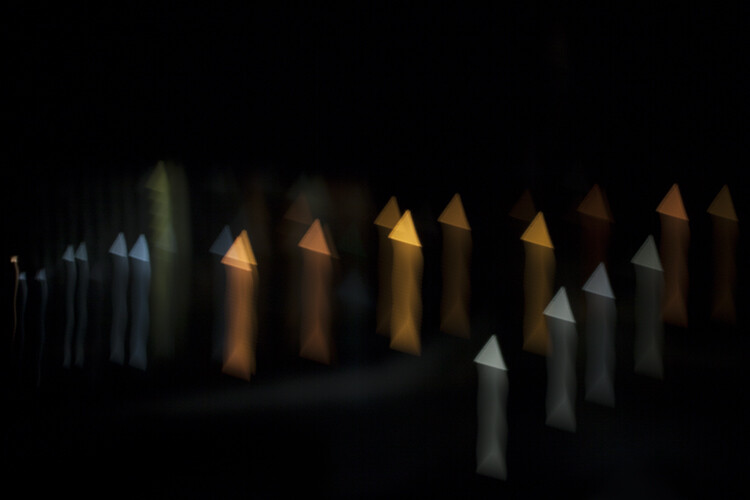
Moving the camera around during exposure with a custom bokeh filter can produce some interesting results

How to Make Custom Bokeh Shapes

How to Make Custom Bokeh Shapes

Light filtered through an oak tree transforms into an intriguing array of diamonds.

How to Make Custom Bokeh Shapes

This bokeh filter transforms car lights into a sprinkle of stars

The post How to Make Custom Bokeh Shapes by Megan Kennedy appeared first on Digital Photography School.


from Digital Photography School https://digital-photography-school.com/make-custom-bokeh-shapes/